The gaps in filling out a GSPR checklist by hand, and how we closed them with AI
A few hundred Annex I sub-clauses, each needing an applicability call with a defensible reason attached. Three steps, and you get a finished MDR or IVDR workbook back.7 min read
The GSPR checklist — the General Safety and Performance Requirements table under EU MDR 2017/745 Annex I, or IVDR 2017/746 Annex I — is the document a notified body opens first. It is also the one nobody on the team wants to own.
Anyone who has filled one in knows the scale of it. Annex I is 23 numbered requirements, but they fan out into a few hundred sub-clauses once you expand them the way a reviewer expects. Every one of those rows needs an applicability decision, and a "not applicable" needs a written justification specific enough to survive being questioned. Then each applicable row needs the standard it was met through, and the evidence document that demonstrates it.
Multiply that by a few hundred rows and it's clear why this takes weeks — and why the drift creeps in: the same device described three different ways across the file, one generic justification copy-pasted into eleven rows, evidence references that say "see biocompatibility report" without naming which one. None of that is carelessness. Keeping three hundred independently-written judgments consistent is simply not something human working memory is built to do.
Enter AI
Once AI became usable, plenty of people tried prompting their way through a GSPR table. We did too. But not everyone can write a solid prompt; output token limits mean the table comes back in fragments; and whatever comes back still has to be pasted into Excel and tidied up by hand. Worse, a general-purpose model will happily cite a standard you don't hold and a test report that doesn't exist — which turns the review from "check the reasoning" into "verify every line," and that is slower than writing it yourself.
RAQB
Since 2025 our team has been working on this, drawing on the experience of dozens of senior RA professionals. GSPR Copilot handles the whole table — applicability, standards, evidence, justification — in three steps. You don't supply Annex I: the MDR and IVDR masters are preset on the platform, and the right one is selected from your device type.
Step 1 — Upload the IFU, confirm the device characteristics
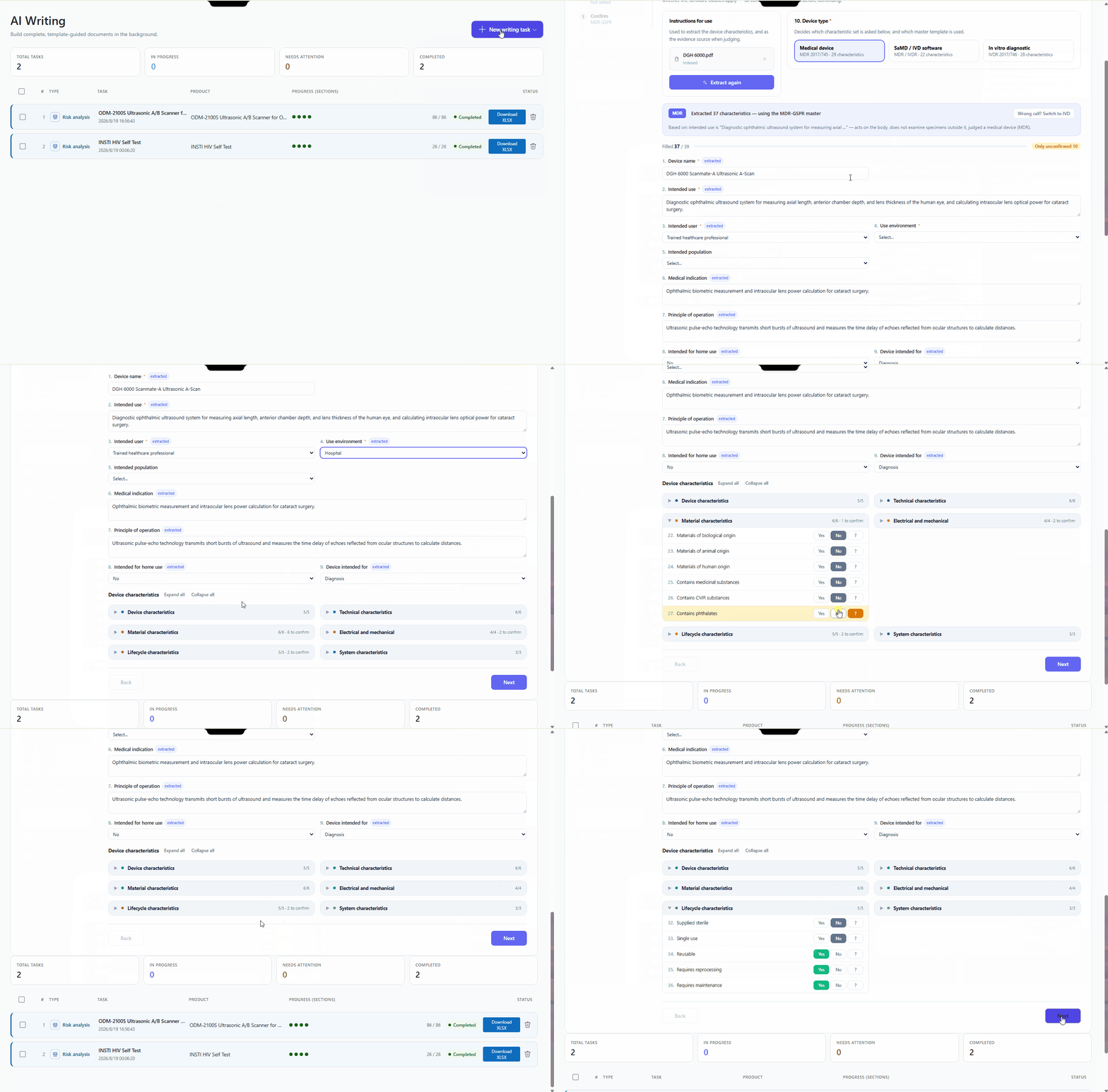
Upload the Instructions for Use, and the AI extracts the device characteristics.
These characteristics aren't a generic intake form — they're the questions that decide the table. Active or passive? Invasive, and if so for how long and in what way? Does it contain software, deliver energy or a substance, have a measuring function? How is it sterilised, what's the shelf life, is it used with other devices? Six groups in all: device, technical, material, electrical and mechanical, lifecycle, and system characteristics.
These characteristics drive every applicability decision that follows. Whether the device contains software, on its own, decides outright whether the software clauses apply. Get them right once and the whole table stays consistent; get one wrong and it propagates into every row that depends on it.
The AI also determines first whether this is a medical device, an IVD, or software, and asks the questions that fit — IVDs get specimen type, testing setting, calibrators and controls; software gets data and risk characteristics — rather than applying one generic form to every product.
Extracted values need your confirmation. Anything the IFU doesn't cover is flagged for you to fill in, and nothing you've already entered gets overwritten. Confirm, then continue.
Step 2 — Add your standards and evidence lists
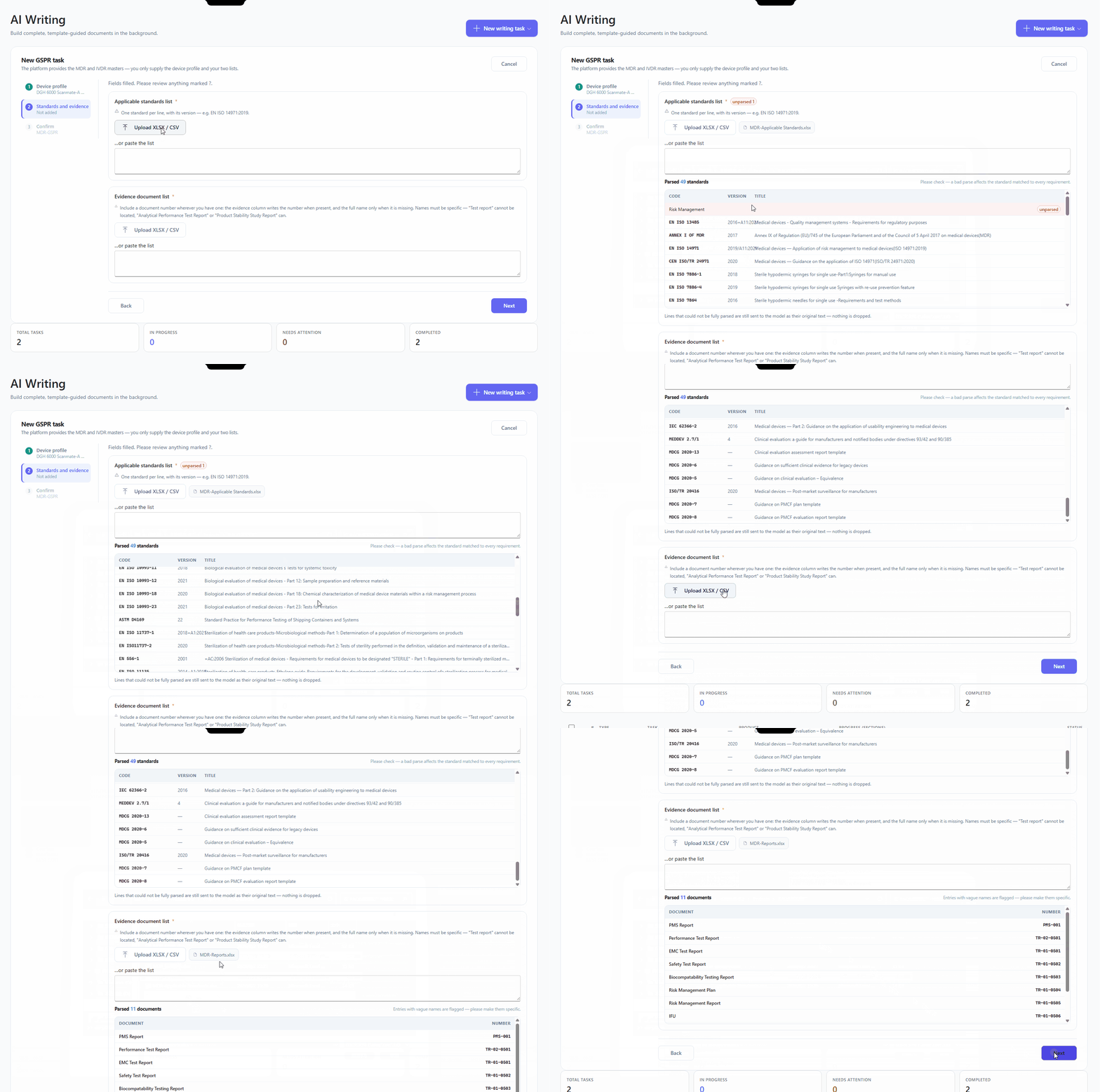
Two lists, uploaded as XLSX/CSV or pasted in as text.
Applicable standards: one per line, with the version — EN ISO 14971:2019. Evidence documents: your document register, with the document number wherever you have one. The evidence column writes the number when it's there and falls back to the full name when it isn't.
One thing worth getting right: evidence names have to be specific enough to locate. "Test report" can't be matched to anything. "Analytical Performance Test Report" or "Product Stability Study Report" can.
As each list parses you get a count of what came through cleanly, what parsed only partially, and what didn't parse at all — so a malformed row shows up here rather than as an empty column three hundred rows later.
These two lists are also the only place standards and evidence come from. The model selects from what you uploaded; it never writes in a standard or a report from memory. It cannot cite something you don't have.
Step 3 — Confirm and run
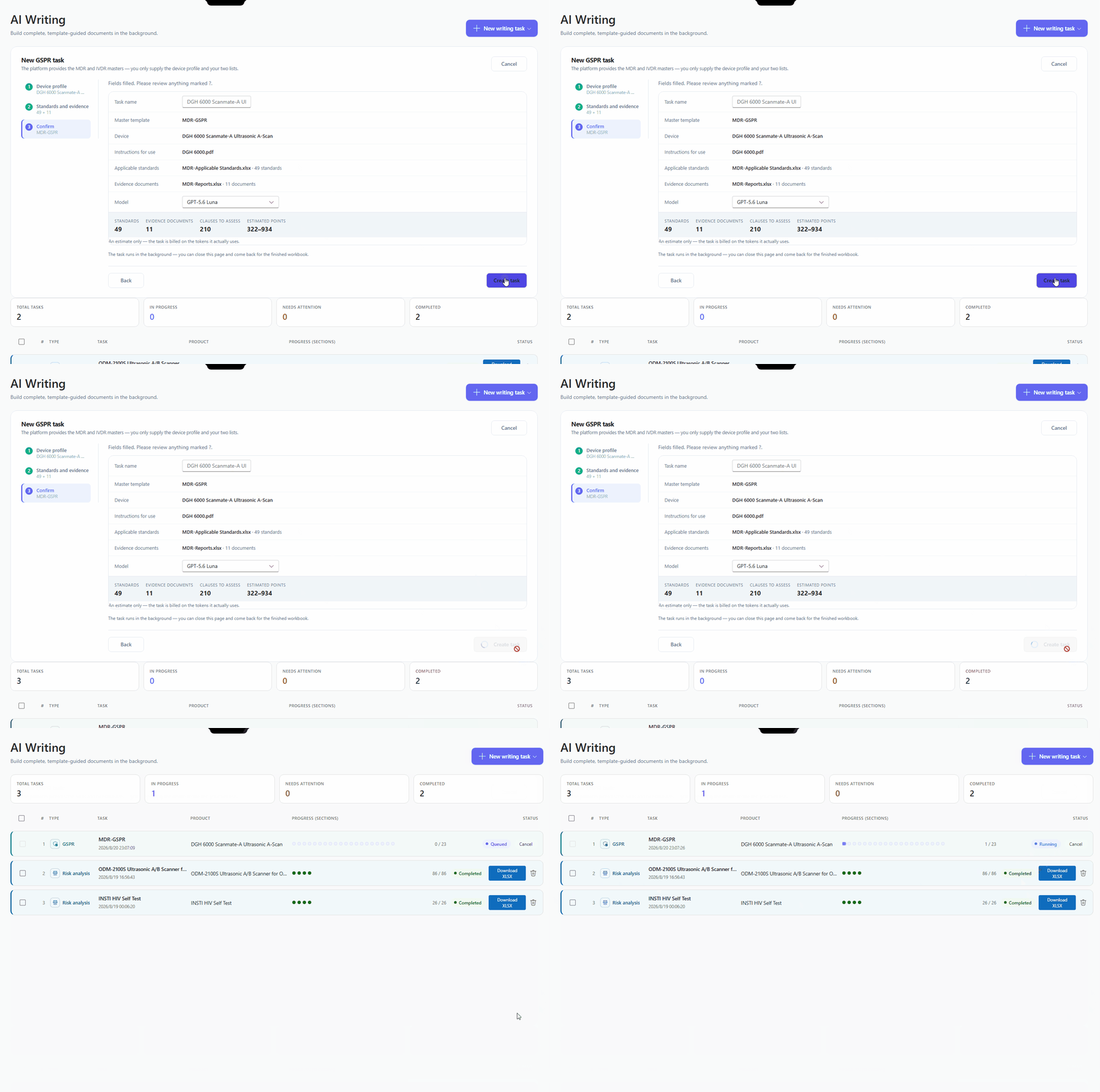
The last screen is a recap: task name, the master that was selected, the device, the IFU, both lists with their entry counts, and the model. Next to it, an estimate — how many standards, how many evidence documents, how many clauses will be assessed, and the points it will cost.
Click create. The task runs in the background, so you can close the page and come back for the finished workbook.
What you get
A workbook built on the same MDR/IVDR master an experienced RA would hand-author: group number, GSPR ID, the requirement text in English and Chinese, and then your four columns — applicability, standards used in full or in part, evidence of conformance, and justification or comment.
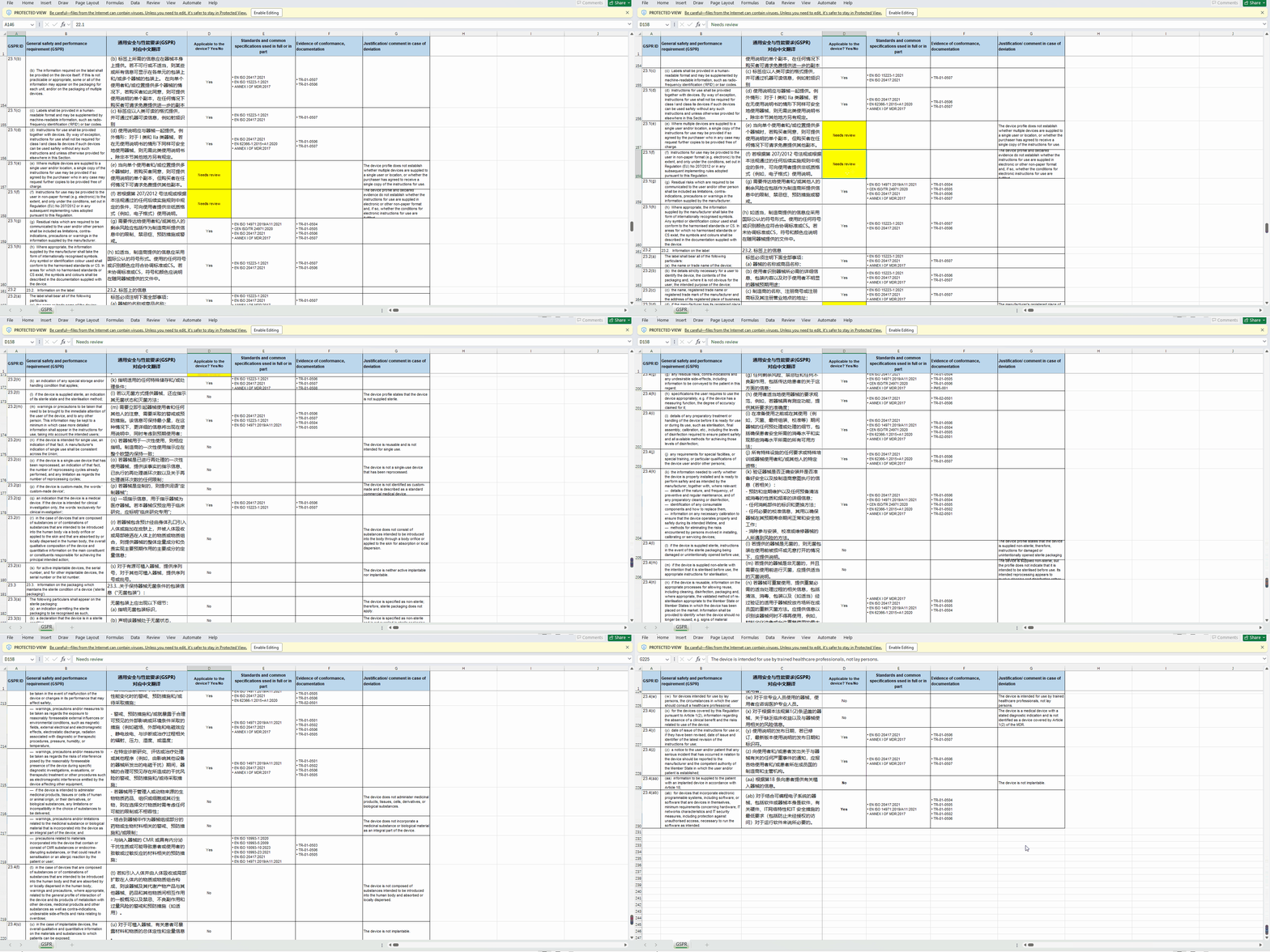
The applicability column takes three values, not two: Yes, No, or Needs review — and the last one is deliberate.
When the device profile is incomplete, the evidence is thin, the device sits on a borderline, or the IFU contradicts the profile you confirmed, the correct answer is not a confident guess. It's a flag. A table with forty honest "needs review" rows is more useful than one with forty guesses, because the first tells you where to spend your afternoon.
Two more rules are built into how that column gets written:
- A bare "No" is impossible. Non-applicability always carries a one-sentence justification referencing a specific device characteristic. If the model can't produce a specific reason, it is required to downgrade to "needs review" instead. Unjustified "N/A" is exactly what draws a deficiency letter.
- Missing evidence is never treated as non-applicability. A requirement doesn't stop applying because your IFU failed to mention it — that's a documentation gap, and it surfaces as one rather than being quietly closed as "not applicable."
Where a judgment rests on the IFU, the reason cites the specific block of retrieved text it came from, so six months later "why is this row N/A" has an answer already written down.
Every applicability decision is AI-generated and must be reviewed by a qualified person before it goes into a submission.
Also in the Excel add-in
The same capability runs as a task pane inside Excel, with much the same steps: build the device profile, upload and confirm the IFU, then run.
The difference is whose workbook it is. The web flow hands back a finished workbook built on our master. The add-in works on the one you already have — you point it at your requirement column, your standards sheet and your evidence sheet, tell it which columns to write to, and it fills them in place, row by row, while you watch. Any column you'd rather it left alone, you set to Skip.
Same engine, same guardrails. Use the web flow if you want a finished draft to come back to; use the add-in if you have a house template you're required to keep, or you'd rather review as it goes.
One thing worth knowing: the add-in isn't limited to GSPR checklists.
It doesn't know what Annex I is. What it actually does is read whatever column you nominate as the requirement, decide applicability row by row, write the reason, match entries from your standards sheet and your evidence register, and write all of that back to the columns you chose. Whether that column holds MDR Annex I, IVDR Annex I, or some other list of clauses makes no difference to it.
So any checklist shaped like "a column of requirements, plus applicability, standards and evidence" can be filled the same way. Header rows and chapter dividers are recognised and skipped rather than assessed as requirements.
Worth flagging, though: the regulatory expertise behind the judgment is currently framed around MDR and IVDR. Point it at a structurally identical checklist from a different regulatory regime and the mechanism still works, but the calls warrant closer review.
GSPR Copilot is available on Plus and above, for both MDR and IVDR.
New here? Use invite code K68N8HEC at checkout for $3 off Plus or $5 off Premium.